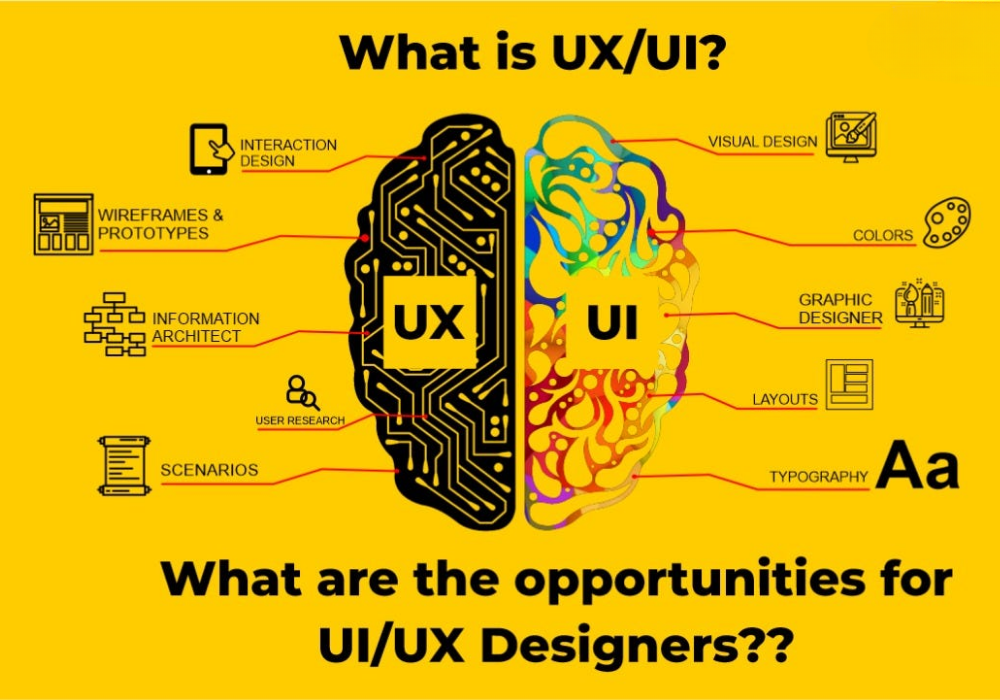
What is UI/UX Design?
UI (User Interface) and UX (User Experience) design are often mentioned together, but they represent different aspects of design. UI design focuses on the visual and interactive elements—buttons, menus, colors, typography, and layout. UX design focuses on the overall experience—how a user interacts with the product and whether those interactions are intuitive and satisfying. Together, they create digital products that are both beautiful and functional.
Core UX Principles
1. User-Centered Design
Everything starts with understanding your users. Conduct user research, create user personas, and constantly test your designs with real users. User feedback is invaluable in creating designs that truly meet user needs.
2. Simplicity & Clarity
Don't overwhelm users with options or complex interfaces. Keep designs simple and clear. Every element should have a purpose. Follow the principle of "Form follows function"—design should serve the user's needs.
3. Consistency
Consistent design elements create predictability. Users should be able to intuitively understand how to navigate your interface because similar elements behave in similar ways throughout the product.
4. Feedback & Responsiveness
Users should always know what's happening. Provide immediate feedback for user actions—loading indicators, success messages, error alerts. Responsive design ensures the product works seamlessly across devices.
Essential UI Design Principles
Visual Hierarchy
Guide users' eyes to the most important elements using size, color, and spacing. A clear visual hierarchy helps users understand content structure and find what they need quickly.
Color Theory
Colors evoke emotions and guide user behavior. Use color strategically to highlight important elements, establish hierarchy, and create brand consistency. Ensure sufficient contrast for accessibility.
Typography
Choose fonts that are readable and appropriate for your product. Use varying font sizes and weights to establish hierarchy. Limit the number of fonts used to maintain visual coherence.
White Space
Empty space isn't wasted space. White space (or negative space) helps content breathe and improves readability. It also prevents cognitive overload by reducing visual complexity.
Usability & Accessibility
Good design is accessible design. Design for users of all abilities. This includes:
- Sufficient color contrast for visibility
- Keyboard navigation options
- Clear alt text for images
- Responsive design for all screen sizes
- Fast loading times
- Clear, simple language
User Testing & Iteration
Design is never truly finished. Conduct user testing regularly. Gather feedback and iterate. A/B testing different designs, heatmap analysis, and user interviews provide insights that drive design improvements.
Mobile-First Approach
Design for mobile first, then enhance for larger screens. With most users accessing content on mobile devices, starting with mobile constraints forces you to prioritize what's truly essential, resulting in better designs overall.
The Design Thinking Process
Successful designers follow a structured process: Empathize (understand user needs), Define (articulate the problem), Ideate (brainstorm solutions), Prototype (create test versions), and Test (gather feedback and iterate). This systematic approach leads to better design outcomes.
Conclusion
Great UI/UX design balances aesthetics with functionality, simplicity with power, and consistency with flexibility. By following these principles and staying focused on user needs, you can create digital products that users love to use.
Want to create exceptional user experiences? Let's work together.