Why Typography Matters
Typography is often overlooked, but it's one of the most important aspects of design. Type conveys meaning beyond the words themselves. The fonts you choose communicate emotion, personality, and professionalism. Good typography improves readability, guides the reader's eye, and enhances the overall user experience. Poor typography can confuse readers and undermine your message, no matter how good the content is.
Font Categories
Serif Fonts
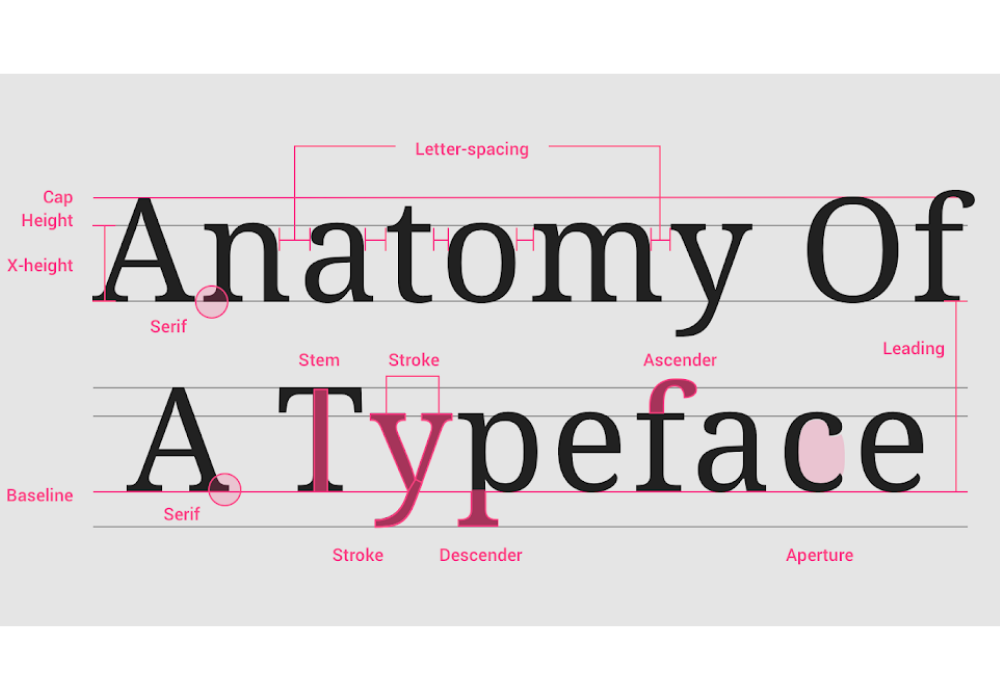
Serif fonts have small lines at the ends of letters. Traditional and formal, they're often used in print media and for long passages of text. Examples: Times New Roman, Georgia, Garamond. Serif fonts convey authority and tradition.
Sans-Serif Fonts
Sans-serif fonts don't have serifs. Modern and clean, they're popular for web design and contemporary brands. Examples: Arial, Helvetica, Open Sans. Sans-serif fonts feel modern and friendly.
Script Fonts
Script fonts mimic handwriting. They add elegance and personality but can be hard to read in large amounts. Use sparingly for headers or special applications.
Display/Decorative Fonts
Highly stylized fonts for specific moods or occasions. Use for branding and headlines, not body text. They're eye-catching but can reduce readability if overused.
Choosing Fonts for Your Design
Font Selection Tips:
- Limit Font Choices: Use no more than 2-3 fonts in a design. One for headings, one for body text creates hierarchy
- Ensure Readability: Choose fonts that are clean and easy to read, especially for body text
- Consider Context: Formal or informal? Traditional or modern? Choose fonts that match your brand personality
- Test on Devices: Fonts display differently on various devices. Test web fonts across browsers and devices
- Pair Complementary Fonts: Use contrasting fonts for headers and body text to create visual interest
Font Hierarchy
Typography creates visual hierarchy. Use different font sizes, weights, and styles to guide readers through content. Large, bold headlines draw attention, body text is smaller and lighter. This hierarchy helps readers navigate and understand content structure.
Hierarchy Elements
- Size: Larger fonts attract attention first
- Weight: Bold text stands out from regular or light weight text
- Color: Colored text draws attention compared to black text
- Spacing: More space around text makes it prominent
Line Length & Spacing
Optimal Line Length
Line length affects readability. The ideal line length is 50-75 characters. Lines that are too long are hard to follow; lines that are too short interrupt reading flow. Use margins and padding to control line length.
Line Height (Leading)
Space between lines affects readability. Too little space makes text feel cramped; too much creates disconnection. A good rule of thumb: line height should be 1.5 times the font size for web text.
Letter Spacing (Tracking)
Space between letters affects readability and aesthetic. Tighter spacing makes text feel compressed; looser spacing can make text feel airy. Adjust spacing strategically for readability and visual effect.
Typography for Digital Media
Web Fonts
Web fonts allow designers to use custom fonts on websites. Services like Google Fonts, Adobe Fonts, and FontAwesome provide thousands of font options. However, more fonts slow down page load, so choose efficiently.
Mobile Considerations
Mobile screens are smaller and have different resolutions. Use larger base font sizes for mobile (14-16px for body text). Test typography across different devices and screen sizes.
Responsive Typography
Typography should scale responsively across devices. Use relative units (em, rem, %) rather than fixed pixels. This ensures text remains readable across all screen sizes.
Accessibility in Typography
- Contrast: Sufficient contrast between text and background is essential for readability, especially for people with vision impairments
- Font Size: Minimum 12px for body text on web, larger for accessibility
- Font Choice: Sans-serif fonts are generally easier to read on screens
- Text Alignment: Left-aligned text is easier to read than justified or right-aligned
Typography & Brand Identity
Typography is part of your brand identity. Consistent font choices across touchpoints strengthen brand recognition. Many recognizable brands have distinctive typographic styles—think Apple's minimalist sans-serif or Coca-Cola's distinctive script.
Conclusion
Typography is a powerful design tool. Good typography makes content readable and accessible while conveying emotion and personality. By understanding font categories, hierarchy principles, spacing, and responsive design, you can use typography to create designs that communicate effectively and look beautiful.
Want to master typography for your brand? Let's discuss your project.